Showing posts with label Microsoft Office. Show all posts

Download Microsoft Office 2013 Preview (Online/Offline .Exe Setup File) - Review and F.A.Q. Details

Microsoft has finally released its most awaited Office 2013 version for general public worldwide. Microsoft Office 2013 is the newest and most advanced Office Suite from Microsoft till now with the most amazing and updated features with Metro design language after Office 2010 version. Microsoft Office 2013 suite is currently available in a customer preview edition (a public beta) which can be download and install on Microsoft's Windows 7 and Windows 8 Operating System on desktop PCs, notebooks, and tablets. Microsoft Office 2013 offers several amounts of desktop applications and has potential to work on a cloud based platforms as well as on Microsoft Server Products (most notably Exchange and SharePoint). Unlike previous releases of Microsoft Office version Ms. Office 2007 and Ms. Office 2010, Ms. Office 2013 is different because its build on upcoming Windows 8 UI structure i.e. Metro Style Apps and Touch UI Interface etc. Microsoft Office 2013 Preview (beta) edition is available for downloading and installing via Online mode and Offline mode (.Exe Setup file) or MSI download directly from Microsoft Server's.

MS. Office Pro Plus 2013 Preview

Read Full Story »»

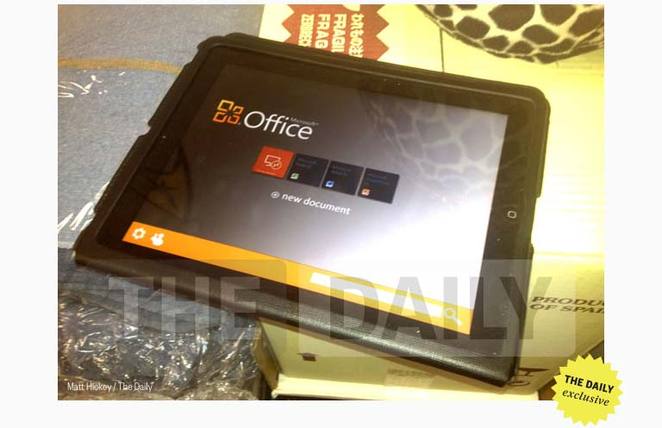
Rumors: Microsoft Office Suite for iOS and Android Coming in November

Earlier in our Blogpost we had mentioned the third party application through which Android and Apple iOS users can access Microsoft Office Word, Excel and PowerPoint Docx files because of non-availability of official Microsoft Office App from Microsoft, but now good news for MS Office users of Apple iOS and Google Android that soon you will be able to get Official Microsoft Office Suite for iPad, iPhone and iPods and also for Google Android devices. According to BGR report Microsoft is soon going to release the official Microsoft Office Suite for iOS and Android running devices (may be in November-2012).

MS Office for iOS Devices

Read Full Story »»

Access Microsoft Office Apps from iPad for Free - Edit, Save, Share Supports

In our last post we announced the Availability of Microsoft Office for Nokia Symbian OS Smartphones and now we are come up with another Microsoft Office App for Apple iPad owners. If you're proud Apple iPad owners than you must be getting frustrating for not finding any perfect free apps that can access and open Microsoft Office files securely and correctly and if you can't wait for the official version of Microsoft Office suite for Apple iPad release from Microsoft than you can try Free CloudOn 2.0 Office App for iPad with Create, Edit, Save and Share features. CloudOn 2.0 is the perfect app for all iPad users who uses their iPad for business purpose and don’t want to lose their documents files. Apple iPad is clearly a popular device for serious business consumers and content creators. There is also another app available for iPad users to access Microsoft Office App called OnLive Office But it’s not better than CloudOn 2.0.


Read Full Story »»

Microsoft Office Suite Officially Available for Nokia Symbian OS Smartphones

Now Nokia's Symbian Operating System Smartphone users can also get Microsoft's Office Suite for their respective versions of Smartphones. Microsoft in February, 2012 had announced that company is planning to release Microsoft Office Suite for Nokia Smartphone's running Symbian OS (Belle). But now Microsoft has moved one step further and have introduced the new Microsoft Office Suite for most of Nokia's smartphone devices includes Nokia 701, Nokia 700, Nokia 603, Nokia E7, Nokia X7, Nokia C7, Nokia Oro, and Nokia C6-01. These Nokia devices owners can Download Microsoft Word, Excel and PowerPoint Full Suite from their Smartphone's software update tool.


Read Full Story »»

Windows XP Supports will be Ends on April 8, 2014: Microsoft

Again Microsoft is reminding its Windows XP operating system users that No More official Supports will be offer to Windows XP after two years from now. Microsoft on its latest post on Windows Blog claims that company is again and again reminding its users to officially switch from 10 Years Old Windows XP to the latest Microsoft OS Windows 7. Even though Windows XP is over 10 years old now but still Windows XP is used by over 46 percent of PCs users worldwide as compared to the Windows 7 OS which shares over 37 percent of worldwide users.


Read Full Story »»

Manually Activate Microsoft Office 2010: Activation Key Genuine

As I told you before about the two different ways of Microsoft Office 2010 Activation in my previous post. Where we have already discussed how you can Activate Microsoft Office 2010 by using KMS Activator software, but some people are still not able to activate their Microsoft Office 2010 copy by using KMS Activator. So for those people who are not able to make their Office 2010 copy genuine by using KMS Activator, they don’t have to worry about it because they can also Manually Activate Microsoft Office 2010 by using manual method without any cracks.

Read Full Story »»

KMS Activator for Office 2010: Genuine Activation Key

As we know Microsoft has already launched its new Office version Microsoft Office 2010 and every office users are switching to this new version and they are not aware of how to activate Microsoft Office 2010 and they are getting trial period of 30 days of product activation and also facing Microsoft Office 2010 Genuine Activation problem. So today I am going to share how you can activate Microsoft Office 2010 and avoid 30 days trial period and make your Office 2010 copy fully genuine and activate for a life time.

Read Full Story »»

Google Cloud Connect for Microsoft Office Released

Google once again comes up with its new feature Google Cloud Connect for Microsoft Office and giving advantage to MS Office customers to go beyond technology by using cloud service.

According to the Google Official Blog the new plug-in for Microsoft Office can be downloaded by everyone who have a Google Account. It allow users to sync all data of Office work from Microsoft Word, Excel and PowerPoint applications and upload them to Google’s cloud. From there all users can collaborate on the same versions of the files at the same time.

Read Full Story »»

Download Microsoft Office 2011 for Mac - Buy from Amazon

Microsoft has released the Mac version of Office 2011 in trial format. The trial version lets you assess Office for Mac 2011 for a 30-day period; once this period is over, you get the choice of uninstalling the program, buying the suite from a store or purchasing a product key online.

The 30-day period is half the length of time that Microsoft currently allows Office for Windows users to test out the Office 2010 suite, as they get a full 60-day test drive.
Read Full Story »»

Microsoft Office 2010 SP1 Goes to Beta Testers

Microsoft has sent out to select beta testers the first iteration of its service pack for Office 2010. The service pack weighs in at 294 MB and is currently making its way into the inbox of a selected group of beta testers.

Office 2010 is Microsoft’s latest version of its popular productivity suite and is used widely across corporate America. A general rule in the IT world is to not install any products from Microsoft until SP1 has been released; this is typically done to ensure stability and security for the end user.

Our tipster has indicated that there are no noticeable changes after first use. This indicates that it may be a large patch to the platform that will further enhance the security and the stability of the application.

Microsoft Office is a big ticket item for Microsoft and its imperative to their financial success that the platform be adopted widely to meet its sales and financial targets. With SP1 just around the corner, Microsoft will soon be able to expect corporate America to begin its adoption of Microsoft’s latest Office offering.

Microsoft Docs Support Facebook Groups Now


As we mentioned before that Microsoft soon going to integrate Facebook Group in its upcoming Microsoft Docs. Until now, sharing a Word, Excel, PowerPoint, or PDF document with other FB users implied doing it individually or choosing every recipient one by one. Not anymore. With the new Facebook Groups integration you can now share a document with a pre-arranged group of peoples.

Unlike Office Web Apps, Docs.com enhances their service with several social networking features. When you share doc, this will post on the Group’s wall via Facebook’s newsfeed, and it will show up on each member’s indivdual wall too. People can also comment on the document on the post or beside the document itself. The coolest thing about this is that you don’t have to have Microsoft Office installed in your computer to use this application. Simply use Microsoft Office Web Apps via Docs and you’re set.

Microsoft Launches "Cloud" Version of Office

Microsoft Corp launched a fully online version of its popular Office suite of applications on Tuesday as it looks to extend its customer base and beat back rival Google Inc.

The new service, called Office 365, is available as a limited test from Tuesday, and will be on sale on a subscription basis worldwide next year.

Combining some of Microsoft's existing cloud-based services, it will be available through most browsers and on mobile devices.

That means customers can get access to Office programs like Outlook e-mail and SharePoint websites without installing software, from virtually anywhere.

The move strikes a blow against rival Google, which has had some success with its Google Apps service, which provides a low-cost, Web-based alternative to Microsoft's traditional Office software.

Shares of Microsoft were down 2.7 percent at $25.12 in morning trading, while Google fell 1.1 percent to $610.95.

Microsoft is doubling down on its commitment to the cloud with the launch of Office 365, a service that combines Microsoft Office, SharePoint Online, Exchange Online and Lync Online with the cloud.

Announced at a press event in San Francisco by Kurt DelBane, president of Microsoft's office division, Office 365 is a subscription service that integrates cloud-based syncing, collaboration, and accessibility to businesses and organizations worldwide. So long as a device supports ActiveSync, customers can access their e-mail, calendars, team websites and office web apps from anywhere. The inclusion of Lync also means that Office 365 has videoconferencing capabilities.

There are two editions of Office 365. Office 365 for Small Businesses is designed for organizations of one to 25 people. It's a pre-built package that includes Office Web Apps, Lync, e-mail sync, and more. It doesn't require IT support on the user's end and will cost $6 per user per month.

The second version is Office 365 for Enterprises. Unlike the small business version, the enterprise edition can be customized based on an organization's needs. It can be customized so different teams have different access levels to Office 365's features. The enterprise edition comes with everything in the small business version, plus single sign-in, Office Pro Plus (via subscription), internal social networking tools, voicemail in the inbox, and more. It costs anywhere between $2 to $27 per user per month, depending on which features the company chooses to utilize.

The beta will be available to a few thousand organizations starting today; its full launch will occur sometime next year in 40 countries. Sometime in late 2011, Office 365 will add Microsoft Dynamics CRM to its suite of products.

Microsoft is extraordinarily bullish on the cloud. DelBane said that the company believes the cloud is as radical of an innovation as the graphical user interface. Office 365 just makes sense though; the rising demand for enterprise-level cloud apps like Dropbox and Box.net is due to its ability to help teams collaborate and coordinate their efforts.
Copyright © gadget buyer guidelines. All Rights Reserved.
Blogger Template designed by Click Bank Engine.